

10 benefits of using Windows Server instead of Linux: When choosing an operating system for your servers, you are often presented with two popular options: Windows Server and Linux. Both have their strengths and are widely used in the industry. However, depending on the nature of your organization and your specific needs, one might be a better fit than the other.
In this article, we will explore the benefits of using Windows Server instead of Linux. While Linux has been a go-to choice for many businesses due to its open-source nature and community support, Windows Server brings unique advantages, especially for companies operating within the Microsoft ecosystem or those needing a more user-friendly interface.

1. Familiar User Interface
One of the primary benefits of using Windows Server instead of Linux is its familiar user interface (UI). Most users and IT professionals are already acquainted with the Windows environment, thanks to the widespread use of Windows desktops and laptops. The UI on Windows Server shares many similarities with its desktop counterpart, making it easier for teams to manage and maintain without extensive retraining. In contrast, Linux often requires users to rely on command-line interface (CLI) tools, which can present a steep learning curve for those who are not familiar with it.
The ability to quickly get up to speed and navigate the system using a graphical interface is a significant advantage for organizations that value ease of use. This is particularly important for businesses that don’t have the resources or time to train their employees on more complex systems like Linux.
2. Integration with Microsoft Ecosystem
Another one of the key benefits of using Windows Server instead of Linux is its seamless integration with the Microsoft ecosystem. Many businesses run Microsoft-based software, such as Office 365, Exchange, and SharePoint. With Windows Server, you can easily integrate these tools with your infrastructure. Active Directory, for example, is one of the most widely used tools for user and resource management in enterprise environments, and it operates best on a Windows Server environment.
Microsoft’s ecosystem is built to work cohesively, meaning that organizations using a Windows Server can expect a smoother experience when integrating their server with other Microsoft applications. This also ensures better compatibility, reduced downtimes, and improved overall productivity. Linux, while powerful in its own right, often requires third-party tools to achieve similar integrations, which may not work as seamlessly as the built-in Microsoft solutions.
3. Better Support for Enterprise Applications
One of the often-overlooked benefits of using Windows Server instead of Linux is its superior support for enterprise applications. Many software vendors create applications that are specifically designed for the Windows Server platform. For instance, enterprise-level CRM systems, ERP applications, and database management tools often come with better support, features, and compatibility for Windows Server.
Moreover, because Windows Server is backed by Microsoft, businesses can rely on extensive documentation, official support, and regular updates. This means that for companies heavily reliant on enterprise software, Windows Server provides a more reliable and stable platform, minimizing compatibility issues that could arise from using Linux.
4. Security and Compliance
Security is a critical concern for every business, and one of the significant benefits of using Windows Server instead of Linux is its security infrastructure tailored for enterprises. While Linux is considered highly secure due to its open-source nature, which allows for constant scrutiny and rapid patching, Windows Server comes equipped with advanced security features specifically designed for enterprises.

For example, Windows Server offers features like BitLocker, which provides full-disk encryption, and Windows Defender, a built-in anti-virus and anti-malware solution. These features help protect sensitive data, which is especially important for businesses that need to comply with regulations such as GDPR, HIPAA, or PCI-DSS. Additionally, Windows Server’s auditing tools and reporting features make it easier to demonstrate compliance with these standards, which can be more cumbersome when using Linux.
5. Ease of Management with Active Directory
Active Directory (AD) is one of the hallmark features of Windows Server and a major reason why many organizations choose it over Linux. The benefits of using Windows Server instead of Linux are particularly evident when it comes to network management and user authentication, as AD simplifies these processes considerably.
Active Directory allows businesses to manage permissions, control user access, and automate tasks across a network of computers. It also integrates well with other Microsoft services and cloud platforms, making it easier for IT administrators to monitor and manage user accounts, devices, and security policies from a centralized interface. While Linux offers alternatives like OpenLDAP, they often require more complex configurations and don’t integrate as seamlessly with other enterprise tools.
6. Graphical User Interface for Server Management
While Linux excels in command-line management, not every IT professional is comfortable or proficient in CLI-based systems. One of the most obvious benefits of using Windows Server instead of Linux is its powerful graphical user interface (GUI) for server management. With tools like the Server Manager and Windows Admin Center, users can monitor server health, manage resources, and configure settings without needing to write code or use complex terminal commands.
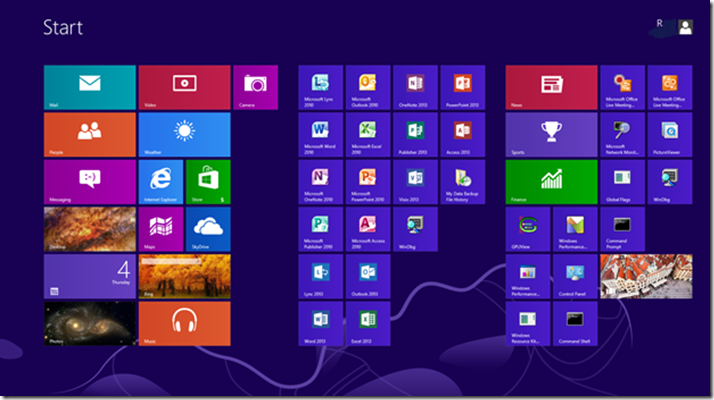
For organizations that value visual monitoring and straightforward administrative tasks, the Windows Server GUI is a clear advantage. Linux, on the other hand, is often more efficient when managed via the terminal, but this is not ideal for teams that require simplicity and quick access to server management functions.
7. Long-Term Support and Updates
Another benefit of using Windows Server instead of Linux is the long-term support (LTS) options that Microsoft offers. LTS versions of Windows Server come with guaranteed security patches, bug fixes, and updates for several years, providing businesses with a stable and secure platform. While some Linux distributions also offer long-term support, they often require more frequent updates and manual intervention.
This predictable support cycle ensures that businesses using Windows Server can rely on consistent updates without disruptions. In a business environment where uptime is critical, this long-term support is invaluable for reducing the risk of unplanned downtimes.
8. Virtualization Capabilities
Windows Server comes equipped with Hyper-V, a robust virtualization platform that allows businesses to run multiple virtual machines (VMs) on a single physical server. Hyper-V is built into Windows Server, offering seamless integration and performance optimization. For businesses that need to run various applications on separate virtual machines, Hyper-V provides a stable and cost-effective solution.
Although Linux offers virtualization options like KVM and Xen, the benefits of using Windows Server instead of Linux in this context are better integration with Windows applications and simpler management of virtualized environments through tools like Hyper-V Manager. This simplifies virtualization for organizations already relying on Windows-based software, minimizing the complexity of running virtual machines.
9. Robust Disaster Recovery Tools
Disaster recovery is a critical aspect of server management, and one of the often highlighted benefits of using Windows Server instead of Linux is the range of disaster recovery tools available. Windows Server comes with built-in features like Windows Server Backup, Storage Spaces, and Volume Shadow Copy, which help in quickly recovering lost data or systems in the event of a failure.
Moreover, Microsoft offers Azure Site Recovery, a cloud-based disaster recovery solution that integrates well with Windows Server environments. This makes it easy for organizations to automate backups and ensure quick recovery with minimal downtime. While Linux has its disaster recovery tools, they often require more manual configuration and lack the deep integration with cloud platforms that Windows Server provides.
10. Comprehensive Customer Support
Last but certainly not least, one of the significant benefits of using Windows Server instead of Linux is the level of customer support that comes with it. Microsoft offers extensive paid support options, ranging from basic assistance to advanced problem resolution and consulting services. Businesses that rely on mission-critical infrastructure can benefit from this 24/7 support, ensuring that any issues are addressed promptly and effectively.

In contrast, Linux relies heavily on community support or third-party vendors for paid assistance, which might not be as reliable or readily available, particularly in high-pressure situations. For businesses that require guaranteed, professional support, Windows Server is a more dependable choice.
What is a Proxy Server and How Does It Work?
Conclusion
The decision between using Windows Server and Linux ultimately depends on your organization’s unique needs and the type of infrastructure you’re running. However, the benefits of using Windows Server instead of Linux become evident when considering factors like ease of use, integration with Microsoft’s ecosystem, enterprise software support, security, and customer service.
While Linux is a powerful and cost-effective alternative, Windows Server’s built-in features, support, and user-friendly tools make it a compelling choice for businesses, especially those that are heavily invested in the Microsoft ecosystem or require advanced enterprise solutions.
By opting for Windows Server, companies can leverage a familiar interface, seamless integration, and comprehensive support, making it a robust choice for enterprise environments looking to maximize their server performance and efficiency.